 AdBlocker
Filter ads and trackers
Block requests to known advertising and tracking services and hide supported banner placements, including some on Persian websites.
FREE & OPEN SOURCE
AdBlocker filters ads and trackers on desktop Chrome, Edge and Firefox. It pays special attention to Persian websites and puts you in control of where filtering runs.
01 / FEATURES
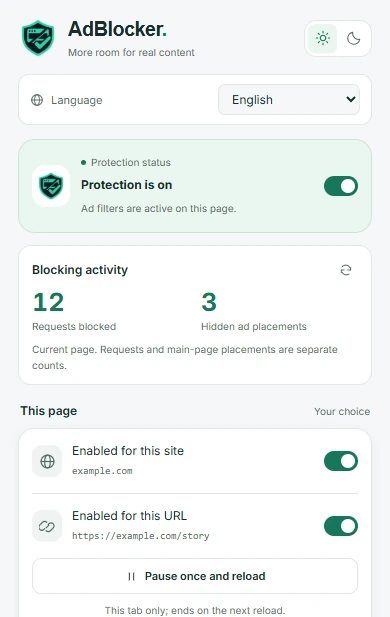
See what was filtered, make exceptions when you need them, and keep your browsing data on your device.
Block requests to known advertising and tracking services and hide supported banner placements, including some on Persian websites.
Switch protection off for a whole site or one URL. Use a one-time pause when a page needs it, then browse with protection again.
The popup counts blocked requests and hidden placements separately for the current page. Several requests can come from one ad.
The extension does not collect browsing history or page contents. Settings are kept in the browser, and there are no analytics SDKs.
02 / TEST RESULTS
On October 28, 2026, one Edge run of the Turtlecute ad blocker test reported 100% (132 out of 132 checks). Browser events confirmed 129 blocked requests, and both cosmetic checks passed. One host timed out.
This result describes that benchmark. It does not measure every website or every kind of ad.
Read the test reportThe current source handles recognizable pre-roll and mid-roll ad states in the desktop player. A real pre-roll was concealed and playback resumed in Chrome. Live mid-roll coverage is still unverified and can vary with the player.
See YouTube test details03 / INSTALLATION
Download the matching ZIP from GitHub Releases, then extract it before installing. Features described here reflect the current source; the release notes list what each downloadable version includes.
Open
chrome://extensionsenable Developer mode, choose Load unpacked, and select the extracted folder.
Open
edge://extensionsenable Developer mode, choose Load unpacked, and select the extracted folder.
Open
about:debugging#/runtime/this-firefoxchoose Load Temporary Add-on, and select manifest.json. Repeat after restarting Firefox.
It includes targeted filters for Persian websites such as Soft98. Coverage depends on the site and can change as the site updates.
Yes. All blocking features are free and the source is available under the MIT license.
The public download is on GitHub. Edge and Firefox store packages are prepared for submission. Chrome Web Store publication is deferred.